Org chart template
Start from a ready-made organizational chart template and make it yours. No login, no upload — everything happens in your browser.
What you get with the template
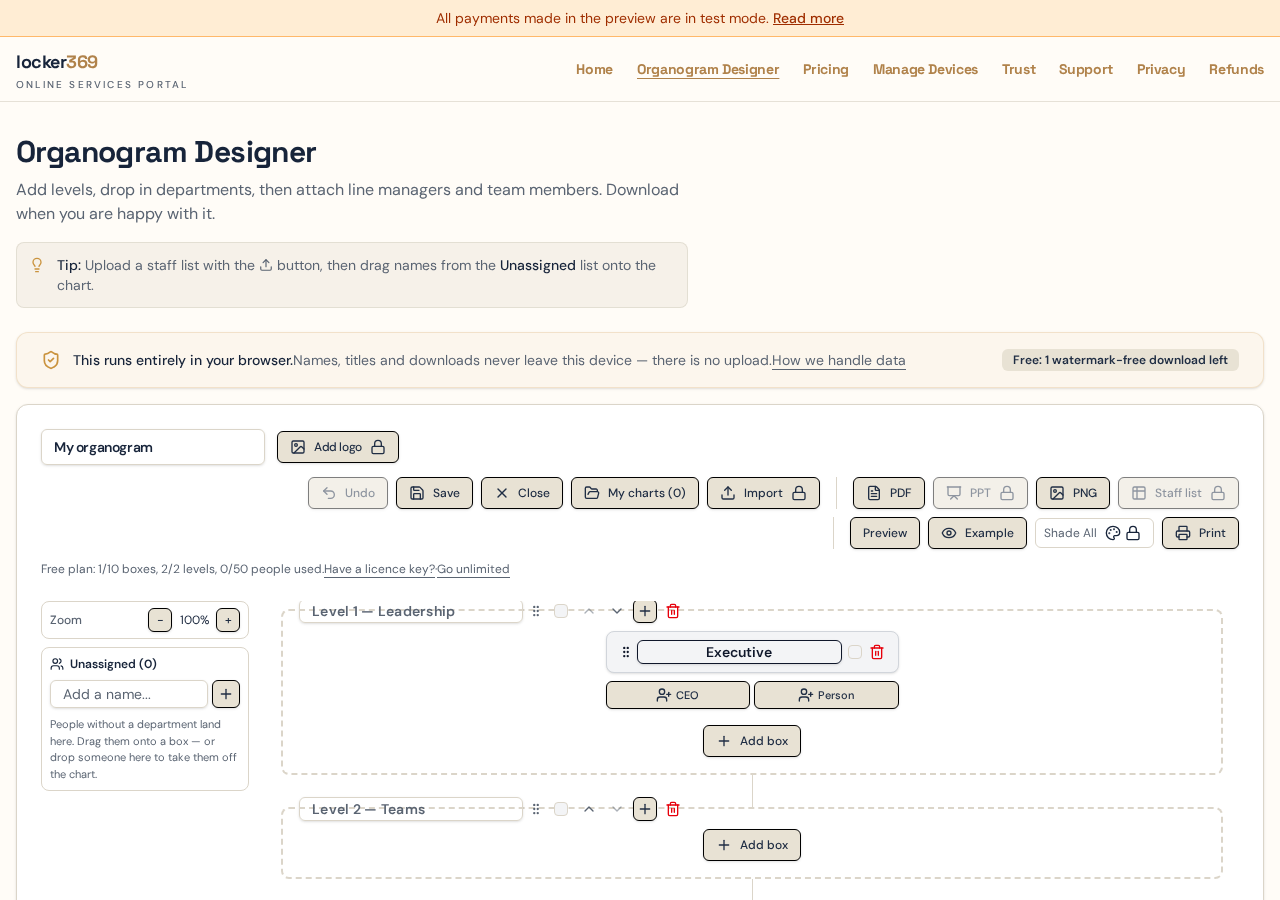
Pre-structured levels and departments you can edit instantly.
Drag people between teams or into an Unassigned list while you decide.
Import your own staff list from Excel or CSV.
Export to PDF, PNG or PowerPoint when you are done.
Four org chart templates to copy
Pick the one closest to your headcount and reporting style, then rebuild it in the designer in a few minutes. Every box name and role below is a suggestion, not a rule — rename anything that doesn't match the language your business uses.
Small business template
One owner or managing director at the top, and four functional boxes underneath. Most people in the business sit directly under a single manager, so there is no middle layer to maintain.
Level 1 — leadership
Managing Director
Level 2 — departments
Operations
- Operations Manager
- Team leads
- Field or production staff
Sales & Marketing
- Sales Manager
- Account executives
- Marketing coordinator
Finance & Admin
- Finance Manager
- Bookkeeper
- Office administrator
People
- HR Officer
- Payroll administrator
Startup template
Founder-led, with a flat product and engineering core. Titles are deliberately light — squads and pods matter more than layers, so the chart shows who works together rather than a long chain of command.
Level 1 — leadership
CEO / Founder · CTO / Co-founder
Level 2 — departments
Engineering
- Engineering Lead
- Backend engineers
- Frontend engineers
- QA engineer
Product & Design
- Head of Product
- Product manager
- Product designer
Growth
- Head of Growth
- Performance marketer
- Content lead
Customer
- Customer Success Lead
- Support specialists
Operations
- Finance & Ops Manager
- People partner
Departmental template
The classic functional hierarchy: an executive band, a head of department for each function, and line managers beneath them. This is the structure most HR systems and job grades already assume.
Level 1 — leadership
CEO · COO · CFO · CIO
Level 2 — departments
Finance
- Head of Finance
- Financial Controller
- Accounts payable team
- Management accountants
Human Resources
- HR Director
- Talent Acquisition Manager
- HR business partners
- Payroll
Information Technology
- IT Manager
- Service desk lead
- Infrastructure engineers
- Applications team
Operations
- Operations Director
- Regional managers
- Site supervisors
Sales
- Sales Director
- Key account managers
- Inside sales team
Marketing
- Marketing Manager
- Brand and content
- Digital marketing
Matrix and shared-services template
Delivery units run down the page while support functions run across it. HR, Finance and IT business partners appear inside the teams they serve without being duplicated as separate people — this needs the shared-services layer on a Pro plan.
Level 1 — leadership
CEO · COO
Level 2 — departments
Division A
- Division Head
- Delivery managers
- Project teams
Division B
- Division Head
- Delivery managers
- Project teams
Shared Services — Finance
- Finance business partners assigned across divisions
Shared Services — HR
- HR business partners assigned across divisions
Shared Services — IT
- Solution architects and support assigned across divisions
The spreadsheet template: three columns, nothing else
If your staff list already lives in Excel, the fastest route is the downloadable template. It deliberately asks for three columns only, because those three are all the chart needs to place a person correctly.
| Name | Department | Level |
|---|---|---|
| Thandi Mokoena | Executive | 1 |
| James Ferreira | Finance | 2 |
| Priya Naidoo | Finance | 2 |
| Sipho Dlamini | Operations | 2 |
| Claire Bennett | (blank → Unassigned) | 2 |
- Name — the person's full name as you want it printed on the card.
- Department — the box they belong in. Spell it identically on every row; each distinct spelling creates a separate box.
- Level — the horizontal band. Use 1 for the executive layer and 2 for departments; the template restricts the column to valid values so typos can't slip through.
- Leave Department blank and the person lands in the Unassigned list on the left, ready to be dragged onto the chart once you decide where they fit.
Download the template from the designer using the Template button — it is free and includes a How-to-use sheet. Uploading a completed staff list is a Pro feature.
Three ways to use the template
Start from the example
Open the template and replace the sample names and departments with your own.
Import your staff list
Download the Excel template, fill in your people and departments, then upload it.
Unlock Pro structure Pro
Upgrade to add shared services, dotted-line reporting and embedded staff.
Frequently asked questions
Do I have to download a file to use the template?
No. The templates open directly in the designer in your browser, already populated with sample levels, departments and people that you overwrite with your own. A downloadable Excel template is also available if you prefer to type your staff list in a spreadsheet first.
What columns does the Excel org chart template use?
Three: Name, Department and Level. Name is the person's full name, Department is the box they belong in, and Level is the horizontal band of the chart — 1 for the executive layer, 2 for departments, and so on. Leave Department blank to send someone to the Unassigned list.
Can I change the departments in the template?
Yes. Every box name, person, job title and colour in the template is editable. Rename Finance to Commercial, delete a box you don't need, or add your own — the template is only a starting layout.
Which template should I pick?
Match it to your headcount. Under about 30 people, the small-business template is usually enough. Between 30 and 250, the departmental template gives you room for heads of department and line managers. Above that, or where people report to two bosses, use the matrix template.
Is the template free?
Yes. Opening and editing a template costs nothing and needs no login. The free plan covers 2 levels, 10 boxes and 50 people with one watermark-free download; larger charts, staff-list import and editable PowerPoint need a paid licence key.
Can I save a template as my own chart?
Yes. Save keeps your working copy in your browser, and Save As creates a new named copy so you can keep the original version of a chart intact while you experiment with a restructure.
Keep reading
- Free org chart maker — the step-by-step build guide and what the free plan covers.
- Organizational chart template — hierarchical, flat, divisional and matrix structures compared.
Customize your org chart template now
No signup required. Open the template, edit the names, and export when you are ready.